Huss Huss Huss Video Generator
Upload one portrait photo to create a 10-second "In This Town" Huss Huss Huss AI video with synchronized grind motion and native audio—ready for TikTok, Reels, and Shorts.
Drop a clear front-facing photo or tap to browse
Solo face, chest-up, or pet portrait works best
Uses 50 credits per 10-second video (one-time packs, no subscription). Photos are safety-checked before rendering and auto-deleted within 24 hours. Failed renders automatically refund your credits.
Upload a portrait on the left to frame your shot. Your generated Huss Huss Huss video will play right here.
Preparing your shot...
Elapsed 00:00
AI generates original motion and voice synced to your scene. After downloading, you can post directly or pair with trending audio in TikTok, Reels, or Shorts.
Husshusshuss (husshusshuss.top) is an independent browser-based AI photo-to-video studio built specifically for the viral "Huss Huss Huss" / "In This Town" meme trend. Upload a single clear portrait, pick a late-night gym, basketball, kitchen, or shadowboxing scene, and render a 10-second 9:16 MP4 with original AI motion and audio—no video editing app required, and uploaded photos auto-delete within 24 hours.
Huss Huss Huss Video Examples
Play two real sample clips below to see the framing, motion pacing, and audio energy before uploading your own portrait.
Huss Huss Huss AI Video — Sample Clip 1
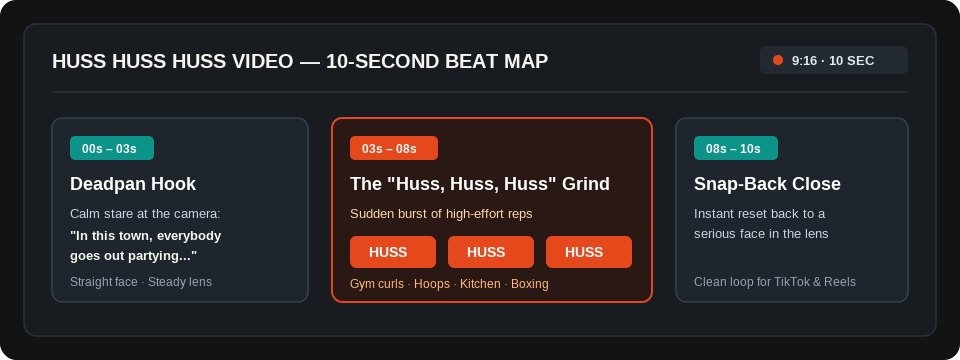
Watch how a single still portrait animates into the deadpan "In This Town" intro and rhythmic "huss, huss, huss" training sequence with native audio.
Huss Huss Huss AI Video — Sample Clip 2
A second sample showing continuous face consistency, camera energy, and punchy grind motion ready to download and share on vertical feeds.
How to Make a Huss Huss Huss Video From One Photo
No manual keyframing, green screen, or Roblox animation editor required—go from still photo to vertical video in three straightforward steps.
-
STEP 01
Upload One Portrait Photo
Drop a clear front-facing photo of yourself, a friend (with permission), or a pet. Your browser automatically resizes large phone photos into a clean JPEG before upload.
-
STEP 02
Pick Scene & Grind Line
Select one of four viral grind backdrops, optionally customize your "In This Town" punchline (or tap a preset chip), and choose 9:16 vertical framing for TikTok and Reels.
-
STEP 03
Render & Download MP4
Our automated safety check verifies the photo, then the AI model renders a 10-second MP4 with synchronized motion and native audio directly in the preview monitor.
Where Did the Huss Huss Huss Trend Start?
The Huss Huss Huss (also known as "In This Town") trend started on TikTok on November 13, 2026, when creator @larpniverse uploaded a short Roblox animation built around deadpan lone-wolf humor. In the clip, a blocky avatar stares straight ahead and delivers a solemn monologue—"In this town, everybody goes out partying except me"—before snapping into frantic basketball dribbles punctuated by sharp, rhythmic exhale sounds: "huss, huss, huss!"
In internet slang, "huss" is an onomatopoeia imitating the forceful breathing athletes and fighters make during heavy reps, sprinting, or shadowboxing. Paired with the self-serious narration, the clip lampooned hyper-dramatic "grindset" edits and racked up over 36 million views inside its first week.
Once music producers flipped the panting cadence into high-BPM Phonk and Jersey club tracks (such as viral DJ Funkyehh–style remixes), the joke broke out of Roblox. Creators began filming real-life gym curls, late-night fast-food burger shifts, and deadpan lip-syncs—which quickly sparked the Huss Huss Huss AI video wave, letting anyone drop a single portrait photo directly into the meme without filming or editing.
Want the full breakdown or ready-made lines? Explore our guides on how to make a Huss Huss Huss video, the full Huss Huss Huss meaning and origin, and 12 In This Town script ideas.
-
NOV 13, 2026
Original Roblox Basketball Clip Drops
TikTok creator @larpniverse posts the original Roblox basketball clip combining the deadpan "In this town" monologue with sharp "huss, huss, huss" breathing cuts.
-
MID-NOV 2026
Viral Audio Remixes & Live-Action Parodies
The upload crosses 36M+ views as producers flip the panting rhythm into fast Phonk and Jersey club tracks, fueling real-life gym and night-shift parodies.
-
LATE NOV 2026
One-Photo AI Video Trend Takes Over
Photo-to-video AI tools make the format one-click: upload a single portrait of yourself, a friend, or a pet and export a 9:16 Huss Huss Huss clip in minutes.
Huss Huss Huss Video Scenes & Photo Guidelines
Pick the backdrop that fits your punchline, then follow the five photo guidelines on the right for consistent face tracking.
| Scene Preset | Action & Camera Beat | Best Fit For |
|---|---|---|
| Gym Dumbbell Grind | Deadpan close-up intro into rapid heavy dumbbell curls under moody gym lights, snapping back to a straight face. | Fitness jokes, "locked in" gym edits, friends who never skip arm day |
| Midnight Court Dribble | Floodlit outdoor basketball court framing with explosive low crossover dribbles timed to three sharp "huss" exhales. | Classic @larpniverse Roblox basketball tributes, hoops edits, sports memes |
| Graveyard Burger Shift | Late-night fast-food counter burst showing hyper-focused burger wrapping while everyone else is out partying. | Part-time job humor, retail/food-service grind memes, chaotic skill parodies |
| Basement Shadowbox | Raw concrete room lighting with fast shadowboxing combinations and tight handheld camera shake on every exhale. | Combat sports fans, dorm/garage training skits, intense anime-style parodies |
Photo Rules for Clean AI Motion
- Use a sharp, well-lit front-facing solo portrait (at least 300px wide; resized locally in your browser to stay under 5 MB).
- Keep eyes and mouth clearly visible—skip heavy sunglasses, face masks, or extreme side profiles.
- Plain or uncluttered backgrounds help the AI cleanly move your subject into the chosen gym, court, or kitchen scene.
- Upload only photos you have permission to use. Every upload passes automated NSFW and minor-safety screening before rendering.
- Uploaded portraits auto-delete within 24 hours and are never displayed in a public feed.
One-Time Credit Packs (No Subscription)
Each 10-second Huss Huss Huss AI video costs 50 credits. Pay once via Stripe with no subscription lock-in and no credit expiration.
100 Credits · 2 Videos
Try your first 2 custom clips with zero subscription
- 100 credits · Generates 2 full 10s videos (50 credits each)
- One-time Stripe payment · Credits never expire
- All 4 grind scenes & aspect ratios (9:16, 3:4, 1:1, 16:9)
- Automatic credit refund on upstream render failures
300 Credits · 6 Videos
Best value for TikTok, Reels & Shorts creators
- 300 credits · Generates 6 full 10s videos (50 credits each)
- One-time Stripe payment · Credits never expire
- Test multiple scenes, custom lines, friends & pet portraits
- Automatic credit refund on upstream render failures
600 Credits · 12 Videos
Lowest cost per clip for high-volume posting
- 600 credits · Generates 12 full 10s videos (50 credits each)
- One-time Stripe payment · Credits never expire
- Ideal for meme pages, friend groups & batch edits
- Automatic credit refund on upstream render failures
Pay once via Stripe — no recurring subscription and purchased credits never expire. Read full details on our Pricing and Refund Policy pages.
Huss Huss Huss Video FAQ
Straight answers about photo requirements, audio output, privacy, credits, and posting to short-form apps.
What is the Huss Huss Huss video trend?
The Huss Huss Huss video trend (also called the "In This Town" meme) is a short-form comedy format that started on TikTok in November 2026. A deadpan speaker states that everyone else in town goes out partying while they stay behind grinding a skill, cutting into fast workout or hustle reps accented by sharp "huss, huss, huss" breathing sounds.
What kind of photo produces the cleanest Huss Huss Huss AI video?
Use one clear, front-facing solo photo with even lighting and an unobstructed face—chest-up portraits and sharp pet photos work best. Avoid heavy sunglasses, strong motion blur, tiny cropped faces, or crowded group shots so the AI keeps your identity steady during fast training movement.
How long does rendering take and what video format do I get?
Our generator renders a 10-second MP4 video in your chosen aspect ratio (9:16 vertical by default for TikTok, Instagram Reels, and YouTube Shorts, plus 3:4, 1:1, and 16:9). Typical rendering takes roughly 45 to 120 seconds depending on AI queue load, and the clip plays directly inside the monitor once ready.
Does the generated Huss Huss Huss video include audio?
Yes. Each clip is created with native AI audio that matches your chosen scene and deadpan "In This Town" line. Because we do not bundle copyrighted third-party TikTok tracks, you can post the clip with its original AI audio or layer the trending DJ remix inside TikTok or Reels before publishing.
Are my uploaded photos stored or shared publicly?
No. Uploaded photos are resized in your browser, checked by our automated safety filter, sent only to the AI video provider to render your clip, and automatically deleted within 24 hours. Generated clips are never posted to a public gallery on Husshusshuss.
Can I make a Huss Huss Huss video of my pet or a friend?
Solo human portraits and clear front-facing pet photos (such as dogs or cats facing the camera) usually animate smoothly. Multi-person group photos are not recommended because the model focuses on one main performer executing the grind routine.
How much does a Huss Huss Huss video cost and do I need a subscription?
No app download is needed—Husshusshuss runs directly in desktop and mobile browsers. Sign in with Google and purchase a one-time Stripe credit pack (50 credits per 10-second video, credits never expire, no recurring subscription). Any upstream render failure automatically refunds your credits.
Community Notes & Scene Requests
Tried the generator or want a new Huss Huss Huss scene added? Drop a short note below.